How Does a Free Online Website Builder Work?
Free website builders come in two forms. Offline builders install on your computer; free online website builders run entirely in the browser, so there is nothing to download and nothing to keep updated. Every platform on this page is the second kind.
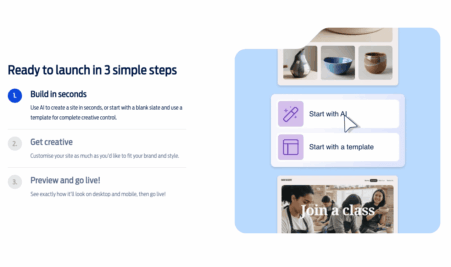
The process is the same almost everywhere:
- Pick a template: free templates are usually grouped by industry or purpose. Template choice is rarely what a free plan restricts — Wix, for instance, opens all 900+ of them on the free tier.
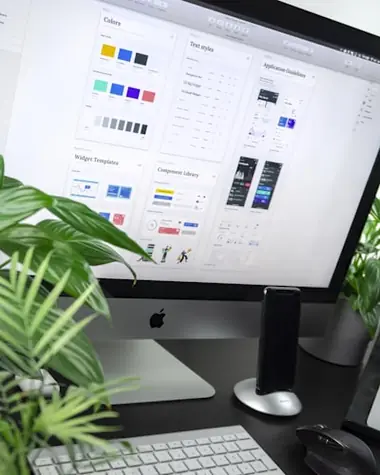
- Use the drag-and-drop editor: text, images, video and buttons move into place by hand. This is the same editor paying customers use; free plans do not get a cut-down version of it.
- Customise: colours, fonts, layouts and menus. Most free plans let you build several pages before any limit bites.
- Preview and publish: what you see in the editor is what goes live, so you can check every detail before anyone else sees it.
Where the free and paid routes actually diverge is after publishing: the address your site sits at, whether the builder’s advertising appears on it, and how much you can upload before you hit a wall.
Why Use a Free Website Builder at All?
Because the risk is zero and the learning is real. You can find out whether you enjoy designing your own site, whether the business idea holds up, and whether you actually need the features you assumed you did — all before spending anything. For a personal project, a portfolio you update twice a year, or an idea you are still testing, a free plan is not a compromise. It is the correct choice.
No coding, and no setup costs
You do not need to know HTML, buy hosting separately, or configure a server. The builder handles all of it, which is why the gap between deciding to build a site and having one live is now measured in hours.
Easy to change later
Updating a page takes a few clicks, so keeping content current stops being a chore you outsource. That matters for search rankings as much as for visitors.
You can move up without starting over
Upgrading from a free plan to a paid one on the same platform keeps your design and content intact. What changes is the address, the branding and the limits — not the work you have already done.
Where the Free Route Costs More Than It Saves
Three situations where staying free is the expensive option:
- You already own a domain. No free tier on this page will let you connect it. You are paying for a domain you cannot use.
- Customers will judge the site. A wixsite.com address and someone else’s advertising on your pages both signal “side project” whether or not that is fair.
- You will outgrow the storage. Site123’s free plan caps bandwidth at 250 MB. Hitting that limit mid-campaign is a worse problem than the £1 a month you avoided.
In each case the fix costs about £12 for a first year with IONOS or Fasthosts, both of which start at £1 a month, and both of which publish what happens at renewal.
Final Thoughts
Start free if you are still deciding. Pay the pound if you have already decided. The platforms ranked above are the ones we would actually recommend in each case — compare the free-plan limits in the mini-reviews, check the renewal figures rather than just the headline price, and pick the one whose trade-offs you can live with.
Frequently Asked Questions About Free Website Builders
Can I really build a website for free?
Yes. Wix, Webador and Site123 all publish free plans with no time limit and no card required. You get hosting, a subdomain and a set of templates at no cost. What you do not get is your own domain name or ad-free pages — those need a paid plan.
What are the limitations of a free website builder?
Usually three: the builder’s branding or advertising appears on your pages, storage and bandwidth are capped, and you are on a subdomain rather than your own address. Site123, for example, caps free-plan bandwidth at 250 MB. For a test site none of this matters; for a business site all of it does.
Is a free plan good enough for a small business?
It is good enough to get started and test the idea. It is rarely good enough to keep, because the subdomain and the third-party advertising work against exactly the credibility a small business site is there to build. Paid plans start at around £1 a month for the first year with IONOS and Fasthosts, which is a small price for removing both.
Are free website builders free forever?
Some are. Wix, Webador and Site123 run permanent free tiers. Squarespace does not: it offers a 14-day free trial with no card required, after which you choose a paid plan. Always check whether “free” means a permanent starter tier or a time-limited trial.
How much does it cost to remove the free-plan branding?
It varies more than you would expect. Webador’s Lite plan is £2.25 a month for the first year, IONOS and Fasthosts both start at £1 a month, and Wix’s cheapest paid plan is £9 a month. Check the renewal rate as well as the intro rate — IONOS, for instance, renews from £16 a month.
How do I create a website for free, step by step?
Choose a builder with a free plan, sign up without card details, pick a template, replace the placeholder text and images with your own, and press publish. On most platforms that is under an hour. Connecting your own domain is the one step that requires an upgrade.
Which is the best free website builder in the UK?
For a genuinely free site, Wix — the free plan has no expiry, no card requirement and access to every template. For a UK-hosted site with UK-based support, Fasthosts from £1 a month. For the best overall value once you accept that a real domain matters, IONOS at £1 a month for the first year.
Can I move my free site to a paid plan later?
Yes, and on the same platform it is straightforward — your pages and design carry over, and the upgrade removes the branding and lets you attach a domain. Moving between platforms is the harder job, which is worth bearing in mind when you choose the free one.